
Video player for learning and storytelling
Company
iris.la
Year
2024
Area of focus
Information Architecture
Product Design
Prototyping
A mobile video player that turns watching into learning — with quizzes, questions and accessible controls built into the video.
I led product design from concept to a shipped product over 17 sprints,
as the only designer, working with a user researcher and 12 engineers. Video completion went up 40%.

The Problem
The Problem
Video players haven’t changed in years: linear, passive, with no way to ask a question or check what you understood.
Creators needed a player that keeps people engaged — even in a 2-minute clip.
Research
Key Insights
Key Insights
01
Long videos overwhelm. Linear, uninterrupted content is hard to process.
02
No way to ask. A question mid-video breaks the learning flow.
03
Watching isn’t learning. People watch passively instead of engaging.
Vertical
failed
We started with a TikTok-style vertical player for a young audience. It trained the wrong habit: swipe to the next thing.
Design response: I pushed for landscape. Games hold this generation’s focus — two thumbs, a clear goal, visible progress.
No answer
in video
20+ video players all did the same thing: play, pause, scrub. None made watching active.
Design response: Borrow from games — modular controls inspired by Nintendo Switch, Call of Duty: Mobile and The Pathless.
Hard-to-reach
controls
In version 1, controls were spread across the whole screen.
Design response: Usability test pointed to the bottom: bottom-aligned controls in version 2 got 27% more clicks.
Version 1 spread controls across the screen.
Version 2 groups playback controls at the bottom.


Episode cards with built-in progress show learners where they are.
Core UX Innovations
Controls stay hidden until
you tap, so the video stays in focus.
Context On‑tap Menu
Controls stay hidden until you tap, so the video stays in focus. This answers insight 01: long videos overwhelm.
Quiz + Interaction Layer
Quizzes appear at key moments inside the video, so checking understanding never breaks the flow. This answers insight 03: watching isn’t learning.
Why we did this?

Because Active Recall
Works
Research shows active recall improves retention compared with passive watching

Because Long Content Overwhelms
Interactive moments break up long content into digestible, rewarding pieces

To Turn Viewing Into Engagement
It transforms video to dialogue - instead of just watching, learners can actively participate.
Messaging During Playback
Tap to ask a question without pausing. The creator, or an AI guide, replies later. This answers insight 02: there was no way to ask.
Accessibility
The platform supports:
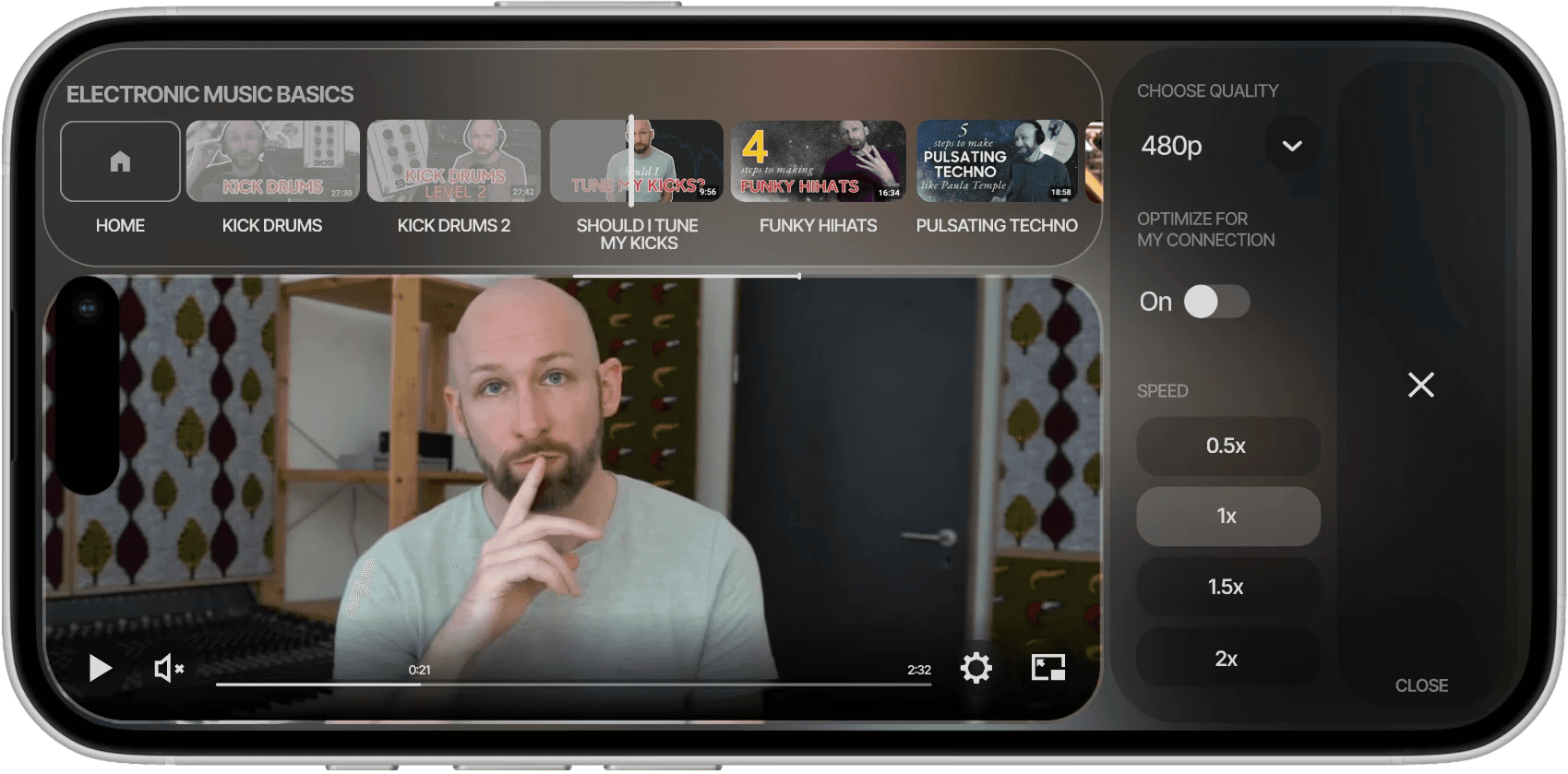
Multiple caption sizes and spacing presets (Compact, Large, Low Vision)
Thumb‑friendly layout for core controls (play, rewind, message, subtitles)
Quick toggles for speed and quality (in an overlay on tap)
Clear text hierarchy and scalable UI elements
Partially optimised for one‑hand use
Screen reader support, with a layout designed for minimal cognitive load
Outcomes & Impact
Outcomes & Impact
+40%
completion rate
vs. passive video
2x
higher completion on
videos with quizzes
92%
of started quizzes
completed
47%
of wrong answers
triggered rewatches
65%
of users ask questions
during lessons
1.8x
retention in accessibility-
enabled sessions
Reflection
Meet a generation where it focuses, not where it scrolls.
Games, not feeds
Young people stay focused in games, not feeds: clear goals, instant feedback, the right to retry.
Proof: wrong answers led to rewatches, not drop-offs.
The idea I let go
An audio-first player for blind users, navigated by sound and gesture. It didn’t fit our business goals at the time.
Why it still matters: accessibility-enabled sessions retained users better, so the audience is there.
Test, don’t debate
With no PM to break ties, small tests settled big decisions.
Example: one control-placement test ended the debate on layout.
Next project
Video Player for Learing and Storytelling
Company
iris.la
Year
2024
Area of focus
Information Architecture
Product Design
Prototyping
A mobile video player that turns watching into learning — with quizzes, questions and accessible controls built into the video.
I led product design from concept to a shipped product over 17 sprints, as the only designer, working with a user researcher and 12 engineers. Video completion went up 40%.
Episode cards with built-in progress show learners where they are.
Version 1 spread controls across the screen.
Version 2 groups playback controls at the bottom.
01
Long videos overwhelm. Linear, uninterrupted content is hard to process.
Long videos overwhelm. Linear, uninterrupted content is hard to process.
02
No way to ask. A question mid-video breaks the learning flow.
No way to ask. A question mid-video breaks the learning flow.
03
Watching isn’t learning. People watch passively instead of engaging.
Watching isn’t learning. People watch passively instead of engaging.
Key Insights
Research
Research shows active recall improves retention compared with passive watching
The Problem
Video players haven’t changed in years: linear, passive, with no way to ask a question or check what you understood.
Creators needed a player that keeps people engaged — even in a 2-minute clip.
Quizzes appear at key moments inside the video, so checking understanding never breaks the flow. This answers insight 03: watching isn’t learning.
Context On‑tap Menu
Messaging During Playback
Quiz + Interaction Layer
Tap to ask a question without pausing. The creator, or an AI guide, replies later. This answers insight 02: there was no way to ask.
Why we did this?
65% of users use the message feature during the lessons
Controls stay hidden until you tap, so the video stays in focus. This answers insight 01: long videos overwhelm.
The platform supports:
+40% completion rate vs. passive video
1.8x better retention in accessibility‑enabled sessions
47% of incorrect answers triggered rewatches - validating feedback design
+40% completion rate vs. passive video
+40% completion rate vs. passive video
1.8x better retention in accessibility-enabled sessions
47% of wrong answers triggered rewatches
2x higher completion on videos with quizzes
92% of started quizzes completed
92% of started quizzes completed
65% of users ask questions during lessons
Core UX Innovations
Outcomes & Impact
Multiple caption sizes and spacing presets (Compact, Large, Low Vision)
Thumb‑friendly layout for core controls (play, rewind, message, subtitles)
Quick toggles for speed and quality (in an overlay on tap)
Clear text hierarchy and scalable UI elements
Partially optimised for one‑hand use
Fully operable with screen readers and designed for minimal cognitive load
Accessibility
Accessibility
Interactive moments break up long content into digestible, rewarding pieces
Meet a generation where it focuses, not where it scrolls.
Reflection
Vertical failed
Vertical failed
We started with a TikTok-style vertical player for a young audience. It trained the wrong habit: swipe to the next thing.
Design response: I pushed for landscape. Games hold this generation’s focus — two thumbs, a clear goal, visible progress.
No answer in video
No answer in video
20+ video players all did the same thing: play, pause, scrub. None made watching active.
Design response: Borrow from games — modular controls inspired by Nintendo Switch, Call of Duty: Mobile and The Pathless.
Hard-to-reach controls
Hard-to-reach controls
In version 1, controls were spread across the whole screen.
Design response: Usability test pointed to the bottom: bottom-aligned controls in version 2 got 27% more clicks.
Games, not feeds
Young people stay focused in games, not feeds: clear goals, instant feedback, the right to retry.
Proof: wrong answers led to rewatches, not drop-offs.
The idea I let go
An audio-first player for blind users, navigated by sound and gesture. It didn’t fit our business goals at the time.
Why it still matters: accessibility-enabled sessions retained users better, so the audience is there.
Test, don’t debate
Test, don’t debate
With no PM to break ties, small tests settled big decisions.
Example: one control-placement test ended the debate on layout.
+40%
completion rate vs. passive video platform
2x
higher completion on
videos with quizzes
92%
of started quizzes completed
47%
of wrong answers triggered rewatches
65%
of users ask questions during lessons
1.8x
better retention in accessibility-enabled sessions
Controls stay hidden until you tap, so the video stays in focus. This answers insight 01: long videos overwhelm.